


Informed Delivery® Mobile
4.7698.00 Reviews
App Specs
- Version
- 1.2.0
- Updated On
- License
- Free
- Downloads
- 500,000+
- Developer
- United States Postal Service®
- Categories
- Business
- Platform
- Android
Screenshots
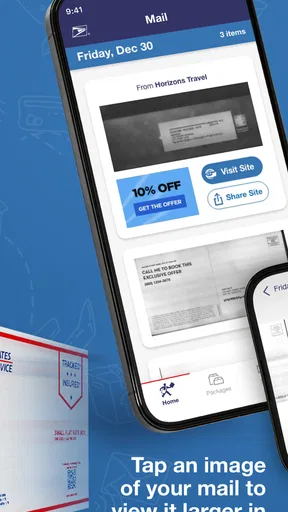
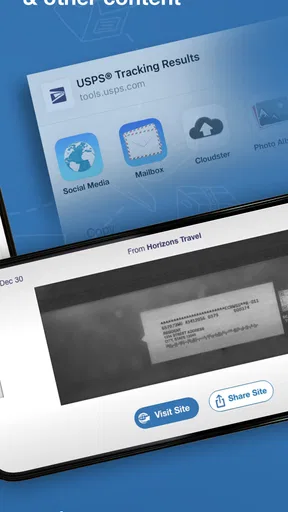
 Analysis by AppCompare
What makes this service useful to me is not simply having another place to check a tracking number. Its distinctive idea is showing a preview image of eligible letter mail before I reach the mailbox. That small change turns a vague “something may be coming” into a practical heads-up: I can recognize a piece of mail, decide whether I need to check the box today, and avoid relying on memory alone. Mail previews are the central reason I would try it.
That preview is a view of the outside of a letter-sized piece, not a way to read its contents or open it digitally. I find that distinction important. The image can help me recognize the sender or the shape of an envelope, but it cannot tell me what is inside, and the occasional uneven image quality means I should treat it as a clue rather than a perfect scan. It is a modest capability, but one that can make a daily routine feel less uncertain.
A useful signal, not a replacement for the mailbox
Informed Delivery® Mobile is a free business app from United States Postal Service®. It is rated for Everyone, and its practical focus is USPS mail and packages rather than managing every carrier or every kind of delivery. If most of the mail I care about arrives through USPS, that focus is helpful; if my deliveries are spread across several services, I still need other ways to follow them.
The service’s value is easiest to understand when I separate mail previews from package tracking. A preview gives me a visual hint about an arriving letter; package updates help me follow a parcel’s delivery status. Those are related needs, but they answer different questions. I would not assume a letter preview means the item has already reached the mailbox, and I would use tracking information—not the image—as the better guide when timing a package matters.
How it fits into an ordinary day
A realistic use for me would be checking the app while planning the day, not watching it constantly. If I see a letter that looks important, I can make a point of checking the mailbox when I get home. If I am expecting a package, I can look at its status and use the available redelivery option when a missed delivery makes that necessary. The useful habit is to check once at a sensible moment, then act on what is relevant.
For someone away from home, that preview can offer a little reassurance and help them decide whether to ask a trusted person to collect the day’s mail. It does not, by itself, handle the physical mail or guarantee that every piece will appear in the preview. I see it as an awareness tool, not a substitute for arranging mail care when a trip is long or an item needs special attention.
There is also a practical way to avoid overreacting to a preview: use it to identify what might be coming, then wait for the physical delivery before making decisions that depend on having the actual document. An image of an envelope cannot confirm its contents, and a delivery status can change. That modest expectation keeps the app useful without asking it to do more than it can.
Worth Reading Before You Choose

EA SPORTS FC Mobile 26 Is a Bigger Football Game, but It Takes Time

Flipboard Shows What News Apps Must Do Beyond the Feed

Switching to Android Auto Means Rethinking Your Driving Routine

Google Calendar Makes a Crowded Week Easier to Manage

Ludo King Makes the Most of the Minutes Between Plans

Baby Panda World Brings Quick Play to Modern Phones, but Its Game Library Feels Busy
Who is likely to get the most from it
I would recommend trying it if USPS mail is a regular part of your household routine, you want a quick way to recognize incoming letters, or you often need to keep an eye on packages handled by the postal service. It may also suit people who share household errands: a preview can help someone explain what appears to be arriving, while the person who checks the mailbox can verify it in person.
On the other hand, I would skip it if I rarely receive USPS mail, expect it to show the contents of letters, or want a single dashboard for every delivery company. In those cases, the main benefit may be too narrow to justify another app. A carrier-neutral parcel tracker or the individual services used by your retailers may be a better fit for monitoring packages from different sources.
To get more value without turning it into a chore, I would first make sure I can sign in to my USPS account, then check whether the arriving mail previews are clear enough to recognize. I would keep package tracking for parcels that genuinely need attention and reserve notifications for updates I care about, rather than treating every alert as urgent. A glance at the dashboard is most helpful when it leads to a simple action—check the mailbox later, follow a parcel, or arrange redelivery if needed.
The app has reached over a hundred thousand installs and has a 4.0 average from around 570 ratings, which suggests it has found an audience while leaving room for mixed experiences. Its current version is 1.2.0, and it runs on Android 8.0 or newer. I’d consider those details alongside my own needs: the ratings are a broad signal, not a promise that every preview will be sharp or every update will answer a time-sensitive question.
For an everyday comparison, a paper calendar or a reminder can help me remember to check the mailbox, but it cannot show a preview of incoming letter mail. A general parcel-tracking app may bring together shipments from different services, yet it may not offer the same USPS mail-preview focus. The choice depends on the problem: if I want cross-carrier parcel visibility, I would favor a broader tracker; if I want an early visual cue for USPS letters, this app has the more relevant purpose.
One trade-off is that the preview can create a little extra uncertainty as well as reduce it. If an image is difficult to read, or a piece I expected is not represented as I thought it would be, I still have to rely on delivery and check the physical mailbox. I would avoid using a preview as proof that a bill, notice, or other important document has arrived. For anything with a deadline, I would continue to use the sender’s own communication or account as the authoritative source.
It is also worth being deliberate about what you want notifications to do for you. Alerts are convenient when a package needs attention, but frequent checking can turn a simple postal tool into one more source of interruption. I’d begin with a light-touch routine and adjust only if a particular delivery has a reason to be monitored closely. That approach makes the app more useful for planning without encouraging me to mistake updates for control over the delivery itself.
Among business apps, this one is unusually tied to a specific everyday service rather than broad office work. That narrowness is a strength for a USPS household and a limitation for everyone else. The release date was Sep 11, 2025, but what matters more to me is whether the app’s central job fits my routine: showing letter previews and helping me keep an eye on USPS packages. If it does, its focused scope is easy to appreciate; if not, a reminder or broader tracker may serve me better.
One question people may have is whether a preview lets them read a letter before it arrives. It does not: I can see an exterior image, which may help identify a piece, but the contents remain private until the physical mail is opened. Another practical question is whether it is useful for a household that mainly receives parcels. It can still help with USPS package status and redelivery, but the mail-preview benefit will matter less if letters are uncommon.
I would also ask whether it replaces a separate tracking routine. For USPS parcels, it can make the relevant status and redelivery options easier to check in one place; for packages handled by other carriers, it is not a universal answer. And if I am away for an extended period, I would not rely on the app alone to protect physical mail. I would arrange for someone to handle the mailbox when needed, using previews only as an extra layer of awareness.
With 251 written reviews among its audience, Informed Delivery® Mobile has prompted a range of responses, which feels unsurprising for a service where usefulness depends on how much USPS mail someone receives and how readable the previews are. The rating gives me a reason to consider it, not a reason to expect a flawless experience. I would try it with a specific purpose in mind—recognizing incoming letters or checking a USPS parcel—and judge it by whether it makes that task simpler.
Ever found yourself wondering if your mail is going to make it on time, or if you’ve missed something important in the post? Well, let me introduce you to a nifty little app called Informed Delivery® Mobile. It's like having a personal assistant for your mailbox, all wrapped up in a neat app for both Android and iOS. I took it for a spin, and here's what I think.
Getting Started with Informed Delivery® Mobile
Downloading and setting up the app is a breeze. You just grab it from your app store, and with a few taps, you're in. The interface is clean and straightforward, making it easy for anyone to navigate, even if you're not the most tech-savvy person out there.
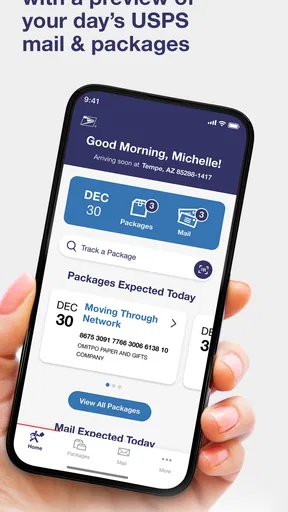
Once you’re logged in with your USPS account, the app gives you a snapshot of what's coming your way. Imagine waking up, sipping your morning coffee, and having a sneak peek at the mail that’s going to hit your mailbox later in the day. Pretty cool, right?
Features That Stand Out
Let’s dive into some of the features that really make this app shine. First off, you get to see digital images of the exterior of letter-sized mailpieces. It’s not exactly opening your mail early, but it's as close as you can get without breaking any laws!
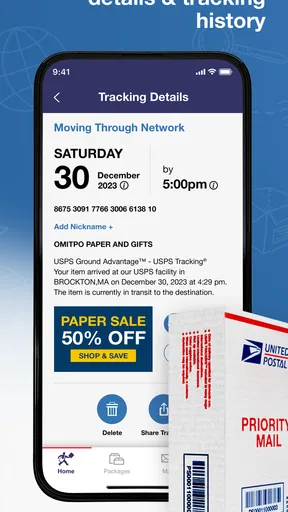
Another feature I found super useful is the delivery status updates. You’ll know with precision when your packages are out for delivery or if there’s a delay. No more guessing games or unnecessary trips to the mailbox.
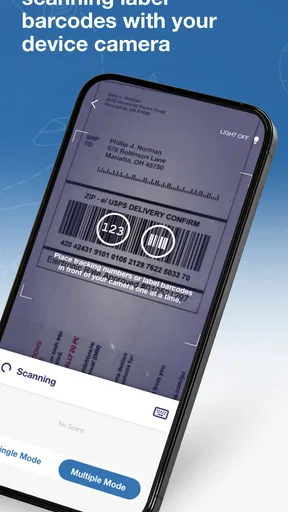
And if you're the type who loves to stay organized, you can track packages and even schedule redelivery for missed items right from the app. It’s like having a mailbox manager in your pocket.
User Experience and Interface
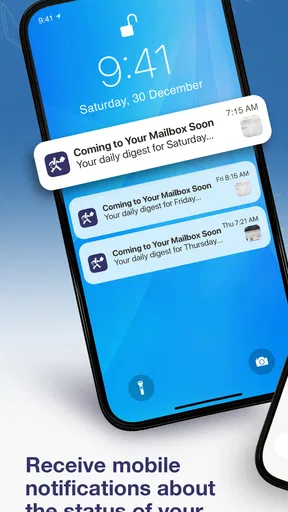
The app’s user interface is pretty slick. It’s all laid out logically, so you won’t find yourself getting lost. The dashboard gives you a quick overview, and everything is just a tap away. I especially appreciated the notifications feature. You can set it to alert you about incoming packages, so you’re always in the loop.
One thing I did notice, though, is that sometimes the image quality of the mail previews can be a bit hit or miss. But hey, it’s still better than nothing, and it gets the job done most of the time.
Why You Should Consider It
If you’re someone who travels a lot or just likes staying on top of things, this app is a game-changer. It saves you the hassle of wondering about your mail and ensures you're never caught off guard by that unexpected bill or important letter.
Plus, it’s completely free. So, you’re getting all these awesome features without spending a dime. It’s a win-win in my book.
Overall, Informed Delivery® Mobile is a handy tool that keeps your snail mail as fast and efficient as possible. Whether you're a busy bee or just someone who wants to stay organized, this app is worth checking out. Give it a whirl and see how it fits into your daily routine!
Pros
- Easy to track mail deliveries.
- User-friendly interface design.
- Notifications for mail updates.
- Secure login with fingerprint.
- Free to use with no ads.
Cons
- Limited to U.S. addresses.
- Occasional app crashes.
- Delayed updates at times.
- Requires stable internet connection.
- No customization for notifications.
FAQs for Informed Delivery® Mobile
What is Informed Delivery® Mobile and how does it work?
Informed Delivery® Mobile is an app offered by the United States Postal Service that allows users to digitally preview their incoming mail and manage packages. By using this app, you can view grayscale images of the exterior of letter-sized mailpieces scheduled to arrive soon. It also provides package tracking and delivery notifications, making mail management more convenient.
Is Informed Delivery® Mobile available for both Android and iOS?
Yes, Informed Delivery® Mobile is available for both Android and iOS devices. Users can download the app from the Google Play Store for Android devices and the Apple App Store for iOS devices. The app requires a stable internet connection to function properly and deliver real-time updates on mail and packages.
How secure is the Informed Delivery® Mobile app?
The Informed Delivery® Mobile app prioritizes user security by implementing strong encryption and authentication measures. Users must create a USPS account and verify their identity to access mail information. This ensures that only authorized users can view sensitive mail data, maintaining privacy and security standards.
Can I manage multiple addresses with Informed Delivery® Mobile?
The app primarily supports one residential address per user account. If you have multiple addresses or frequently move, you can update your address in the app settings. However, managing multiple addresses simultaneously within one account is not a feature currently supported by the app.
What should I do if I encounter issues with the app?
If you experience any issues with Informed Delivery® Mobile, you can try troubleshooting steps such as restarting the app, checking your internet connection, or updating to the latest version. For persistent issues, you can contact USPS customer support through the app or visit their website for further assistance.


